Hunting Magento LCP: A Chrome DevTools MCP Audit
Mobile LCP at 5.3 seconds. TTFB at 3.8. Lighthouse flagged images, render-blocking resources, and layout shift.
That is a starting point, not a diagnosis. On Magento, every one of those signals can have four different causes depending on which layer is responsible. A Magento store has server response time, theme CSS, page builder output, image generation pipelines, third-party module processors, and CDN behavior — often broken in multiple places at once. The score alone does not tell you where to cut.
The only way through is to open the actual browser and start looking at what it received.
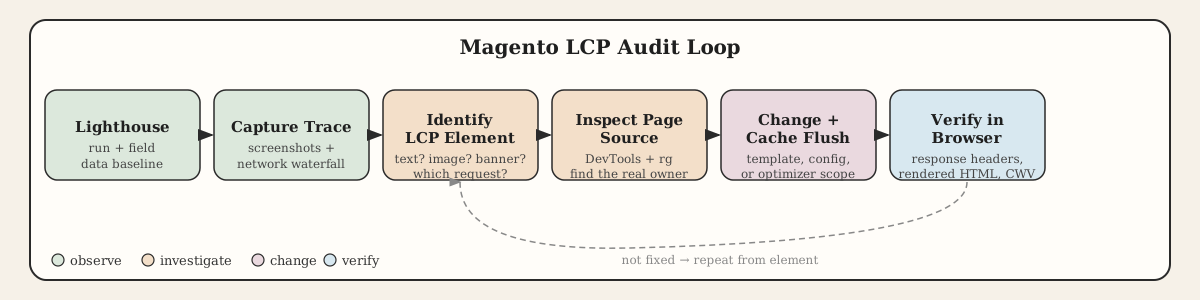
Chrome DevTools MCP kept that loop tight. Instead of treating Lighthouse, DevTools, curl, database search, and Magento config as separate sessions, I could move between them in one flow without losing context. The browser stayed connected to the source.
The Trace Before the Fix
For LCP work, the Lighthouse summary is the wrong place to start. It tells you what categories failed. It does not tell you which element triggered the metric, when the browser discovered the image URL, or whether a render-blocking request delayed the whole chain.
The trace does.
On this store, the trace and screenshots made three things clear almost immediately: a footer image was causing layout shift on late load, the category brand grid was not helping the browser prioritize its first visible images, and the product gallery placeholder — the actual LCP element on product pages — was coming back as JPEG even though the store had a WebP optimizer installed.
Three separate problems. Three separate fixes.
CLS First: The Footer Payment Image
The first fix was not an image format problem.
The Lighthouse lab run flagged Cumulative Layout Shift. Field CLS looked fine — field data averages real visits over time, lab data captures one load, and that discrepancy is common. Both are real; they measure different things.
The visible culprit was a footer payment icon rendered through WYSIWYG content:
<img
    style="float: right;"
    title="Payment methods accepted"
    src="{{media url=wysiwyg/theme/payment-methods.png}}"
    alt="Payment methods"
    width="758"
    height="75">
The block around it did not reserve space in a way the mobile layout could rely on. The image arrived late, shifted content, and the dimensions on the <img> were not enough to hold position when the surrounding block had no stable height.
The fix was small: stable block dimensions, explicit width and height the browser could use before the image loaded, and let the optimizer serve the better format once the file existed. No JavaScript, no layout surgery. The browser just needed space to work with.
Finding the Image That Was Not Where It Should Be
One of the slower parts of Magento performance work is finding out who actually owns an image.
A visible element in the rendered page can come from a CMS block, Page Builder content, a category description, a product gallery, a theme template, a custom module, or an extension-rendered widget. The admin panel where the client expects to find it is sometimes not where it lives.
On this store, a sidebar banner appeared in the rendered HTML but was not visible in the admin area the client had been editing. The fastest path: pull the filename from DevTools Network, search the rendered source for it, then run rg against the repository for the same token.
rg "payment-methods" --type php --type html
That exposed the actual block. Once the correct source was found, the replacement was straightforward. The risk without that step is editing the wrong place and having no effect — or having the wrong effect.
Category Images: Two Attributes That Helped the Browser
The category brand grid was generated by custom PHP, not Page Builder. It already had dimensions on the images, which is the right instinct. What it lacked was any signal to help the browser prioritize the first visible ones.
The original output:
<div class="subcategory" style="display: inline-block; text-align: center; vertical-align: top">
    <a href="https://store.example/products/acme-networks.html">
        <img
            alt="Acme Networks"
            src="https://cdn.store.example/media/catalog/category/acme-networks.jpg"
            width="200"
            height="200"
            style="margin: 15px 20px 0 20px; border: 2px solid gray;">
    </a>
</div>
The template change:
<img
    alt="<?= $block->escapeHtmlAttr($_subcategory->getName()) ?>"
    src="<?= $block->escapeUrl($imageUrl) ?>"
    width="200"
    height="200"
    loading="<?= $index < 4 ? 'eager' : 'lazy' ?>"
    fetchpriority="<?= $index === 0 ? 'high' : 'auto' ?>">
The first visible brand image should not be treated like a thumbnail below the fold. fetchpriority="high" and loading="eager" on the first few images tells the browser exactly what the layout already knows: these are above-the-fold content, request them now.
After deployment and cache flush, category LCP moved in the right direction. Not perfect, but enough to confirm the change was doing something real.
The Amasty Problem: Not a Config Issue
This is where the audit got interesting.
Product images were the next layer. The store used Amasty Image Optimizer. WebP was enabled in the admin. WYSIWYG images had WebP output. Some category images were optimized.
The main product gallery placeholder was still returning:
content-type: image/jpeg
content-length: 25151
The product gallery placeholder is important. On a product detail page, Magento renders an image before the JavaScript gallery initializes:
<div class="gallery-placeholder _block-content-loading" data-gallery-role="gallery-placeholder">
    <img
        class="gallery-placeholder__image"
        src="https://cdn.store.example/media/catalog/product/cache/.../product_image.jpg"
        width="700"
        height="700">
</div>
That element is usually the LCP element on a product page. If it stays JPEG while everything else is WebP, the product page still pays the full LCP cost.
The question changed from "is WebP enabled?" to "why is this specific image not WebP?"
Those are not the same question.
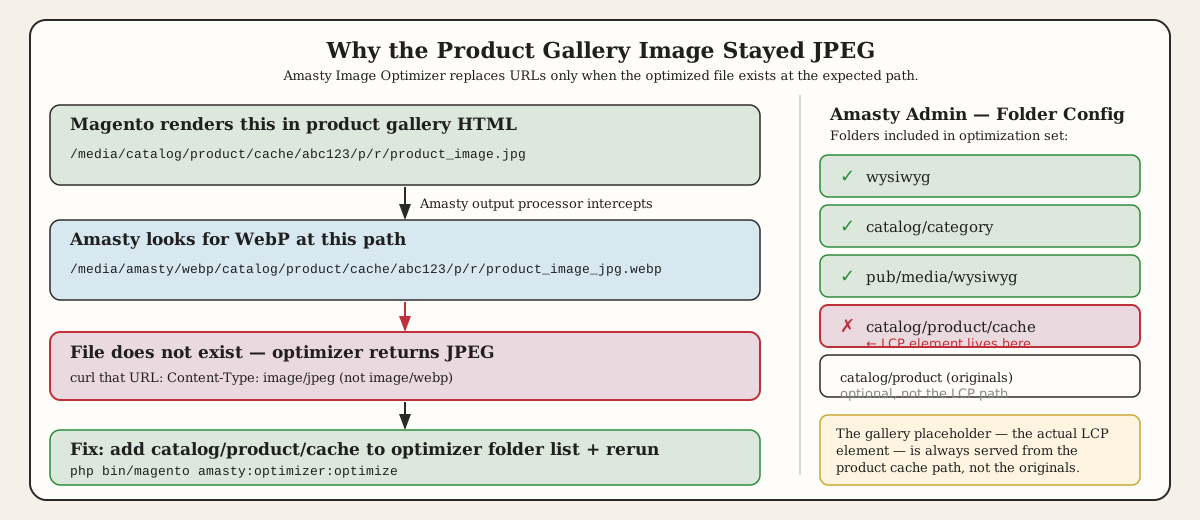
Amasty's output processor replaces image URLs in rendered HTML — but only when the optimized file already exists at the expected path. For a product cache image:
/media/catalog/product/cache/abc123/p/r/product_image.jpg
The optimizer looks for:
/media/amasty/webp/catalog/product/cache/abc123/p/r/product_image_jpg.webp
I tested that URL directly. It returned JPEG. Not a 404 — the file existed, but it was not a valid WebP asset.
The optimizer had not failed to replace the URL. It had no valid WebP to replace it with.
The admin folder configuration covered WYSIWYG, catalog/category, and banner paths. catalog/product/cache was not in the list. That is exactly where Magento writes the resized images that end up in product gallery HTML. Without it in the optimizer scope, no WebP files were ever generated for product cache images — so every gallery placeholder stayed JPEG.
The fix was operational:
php bin/magento amasty:optimizer:optimize
With catalog/product/cache added to the image setting folder list. For broader coverage, catalog/product can be added for originals, but the cache path is what controls the LCP element.
What Actually Moved the Numbers
The improvements were focused and specific.
The footer payment image got stable block dimensions and let the optimizer handle the format. CLS contribution from that element stopped.
The hidden sidebar image was found in its actual content source and replaced with clean markup. No more searching the wrong admin screen.
The category brand grid got fetchpriority and loading attributes on the first images. Category LCP improved.
The authentication popup module dependency was removed from page types that never use it — one less initialization chain on pages where it added cost and no value.
Product structured data was verified in the same production inspection flow to confirm no duplicate schema was introduced by an SEO change. That is worth checking in the same pass even when it is not the performance target.
Product image WebP handling was narrowed to a concrete missing asset problem: catalog/product/cache was not in the Amasty optimization scope, so the expected WebP paths were never generated. Adding the folder and rerunning the optimizer resolved it.
The security response headers — Feature-Policy: vibrate, broken Permissions-Policy directives — were real issues flagged by the browser console. They go on a separate cleanup list. They were not in the LCP critical path.
The Audit Discipline
There is one consistent mistake in Magento performance work: treating an admin setting as proof of behavior.
A setting can be enabled while:
- the folder scope misses the generated cache path
- the optimizer queue has not processed the image yet
- the CDN still serves an old asset
- the page source uses a different image rendition than you are checking
- the gallery JavaScript swaps in a different URL after the placeholder loads
"WebP is broken" is not actionable. "The expected /media/amasty/webp/catalog/product/cache/..._jpg.webp URL is not returning image/webp" is actionable. That is one curl command away from a real diagnosis.
Chrome DevTools MCP was useful here because it kept that distance short. When Lighthouse flagged layout shift, I could inspect the element that caused it. When an optimizer looked configured, I could test the actual URL the browser would request. When a console warning appeared, I could read the response header that produced it — and decide whether it mattered for the metric I was fixing.
The real LCP question on any page is not which optimization extension is installed. It is: what did the browser discover first, what did it request, and why was that not the best possible asset?
Answer that for each page type. The fixes are usually smaller than the report makes them look.