How to Reduce Token Usage in AI Coding Tools for Large Magento and PHP Codebases
AI coding tools are useful only when they stay focused.
That sounds obvious until you point one at an older commerce repository and ask it to "take a look." A few minutes later it has read layout XML, observers, plugins, generated classes, admin UI blocks, half of etc/di.xml, and a service class nobody has touched since 2019.
Claude Code, Codex, and Copilot can save real time on Magento, PHP, and full-stack work. They can also burn tokens, produce large patches, and confidently walk into parts of the repository that have nothing to do with the problem. On large legacy projects, that is not a minor annoyance. It is how a small fix turns into a noisy review.
The difference is rarely just the model. The difference is how tightly you frame the job.
Why Token Optimization Matters
Token usage is not only a billing problem.
For real development work, poor token control creates three problems:
- Cost: long prompts, full-file dumps, and vague instructions increase usage fast.
- Speed: large context windows slow down reasoning and tool execution.
- Quality: unrelated context makes the agent less precise.
In Magento projects, this gets worse because the system has many places where behavior can hide: DI preferences, plugins, observers, layout XML, UI components, cron jobs, indexers, and third-party modules. A weak prompt like "review this module" gives the agent permission to wander.
I have seen this on legacy PHP work too. One billing bug sits in a mapper, but the tool spends half its answer on controller structure. One performance issue comes from a collection inside a loop, but the answer includes a new caching abstraction, logging changes, and a test rewrite. Technically impressive. Not helpful.
A good prompt narrows the problem before the model starts spending context.
Practical Token Reduction Techniques
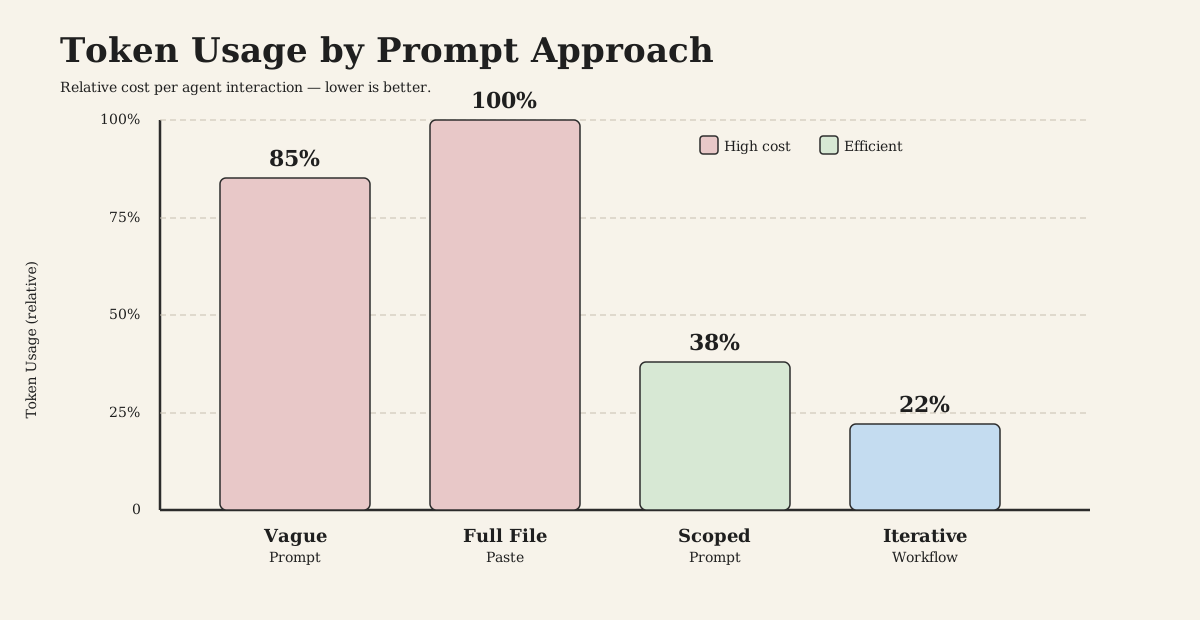
Prompt Design
Bad prompts ask for thinking. Good prompts define work.
Instead of:
Can you check why this Magento module is slow and improve it?
Use:
Review only app/code/Beljic/CatalogExport for performance issues in export generation.

Focus on:
- collection loading
- N+1 queries
- memory usage
- unnecessary repository calls

Output:
- max 5 findings
- file + line
- concrete fix
- no rewritten files unless asked
The optimized version reduces token usage because the agent knows:
- where to look
- what to ignore
- how much to return
- whether to edit or only review
That last point matters. If you only want a review, say so. Coding agents are biased toward action. In a mature repository, action without boundaries is expensive.
Output Constraints
Most token waste happens after the model already found the answer.
Use hard output limits:
Return only:
1. Root cause
2. Minimal patch summary
3. Test command

Max 300 words.
No background explanation.
This is especially useful when using AI coding tools inside a loop. You do not need a tutorial every time. You need the next decision.
I usually ask for findings first, patch second. It slows the first response slightly, but it prevents the tool from "fixing" three unrelated things while I was only trying to confirm one bug.
Context Trimming
Do not paste entire classes unless the whole class matters.
Bad context:
Here is the complete module. Tell me what is wrong.
[pastes 900 lines]
Better context:
This Magento cron exports products to CSV.

Relevant files:
- ExportProducts.php creates the collection
- CsvWriter.php writes rows
- ProductData.php maps attributes

Find memory and query problems only.
Ask before reading unrelated files.
Even better: let the agent inspect files itself when it has filesystem access. File paths are cheaper than pasted code, and the agent can pull only the ranges it needs.
There is a practical warning here. Do not let the agent treat vendor/, generated code, cache directories, or old deployment artifacts as normal application context. Large repositories often contain history, copies, and dead code. The model will not always know that unless you tell it.
Iterative Workflow
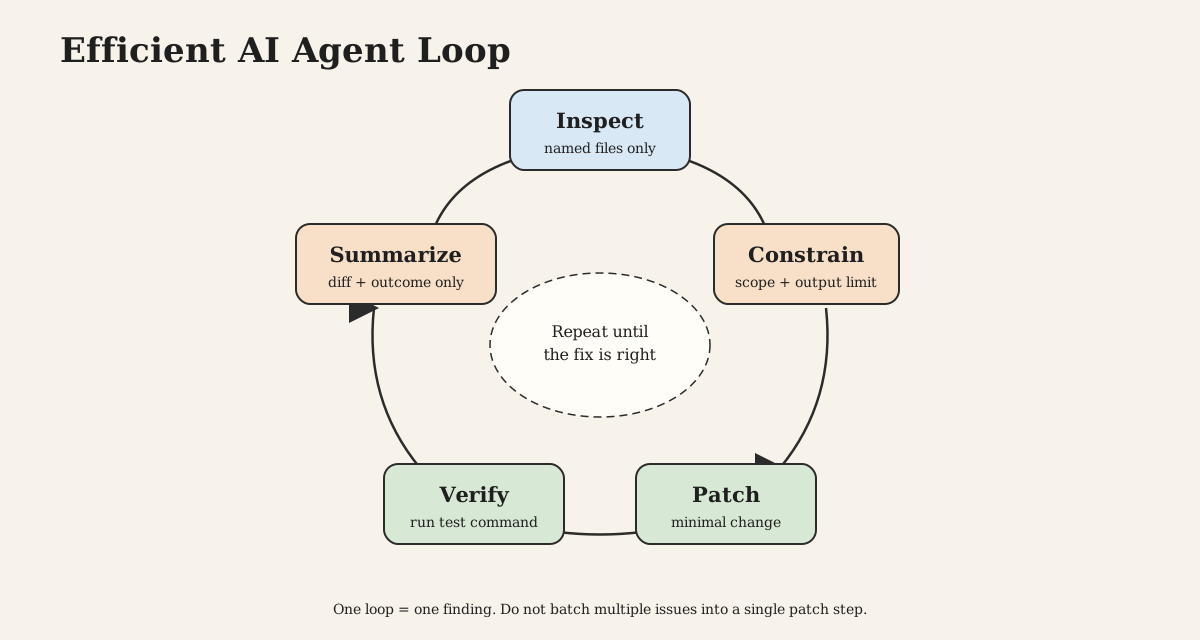
Do not ask the agent to solve everything in one turn.
A better sequence:
- inspect relevant files
- list likely issues
- patch the highest-impact issue
- run focused tests
- review the diff
This keeps context small and makes mistakes easier to catch.
It also matches how senior engineers work on older systems. You do not refactor an order export, tax rule, or checkout plugin just because you touched it. You change the smallest useful part, verify it, and leave the surrounding risk alone unless the business problem requires more.
Real Magento Prompt Examples
Bad Prompt Example
Optimize this Magento 2 plugin and make it production ready.

<?php

declare(strict_types=1);

namespace Vendor\Module\Plugin;

use Magento\Catalog\Api\ProductRepositoryInterface;
use Magento\Checkout\Model\Cart;

class AddProductData
{
    public function __construct(
        private ProductRepositoryInterface $productRepository
    ) {}

    public function afterGetItems(Cart $subject, array $items): array
    {
        foreach ($items as $item) {
            $product = $this->productRepository->getById((int) $item->getProductId());
            $item->setData('brand', $product->getCustomAttribute('brand')?->getValue());
        }

        return $items;
    }
}
Optimized Prompt
Review this Magento 2 PHP 8.3 plugin for performance only.

Context:
- Runs on cart item rendering
- Product data may already be loaded on quote item
- Avoid repository calls inside loops

Output:
- root cause
- minimal code change
- why it reduces queries
- max 250 words

Do not discuss style, DI, or unrelated Magento best practices.
Result Difference
The bad prompt usually produces a broad answer:
- explains plugins
- suggests caching, logging, tests, typing, exceptions
- may rewrite the whole class
- spends tokens on generic advice
The optimized prompt gets to the useful part:
<?php

declare(strict_types=1);

namespace Vendor\Module\Plugin;

use Magento\Checkout\Model\Cart;

class AddProductData
{
    public function afterGetItems(Cart $subject, array $items): array
    {
        foreach ($items as $item) {
            $product = $item->getProduct();

            if (!$product) {
                continue;
            }

            $item->setData(
                'brand',
                $product->getCustomAttribute('brand')?->getValue()
            );
        }

        return $items;
    }
}
The fix removes ProductRepositoryInterface::getById() from the loop. On a cart with 20 items, that can remove 20 product loads from a request path that should stay cheap.
The important detail is not that AI found the issue. A decent developer would spot it too. The value is getting the tool to stop there.
Before And After: Agent Task Prompt
Bad Prompt
Refactor this Magento order export service and make it better.
Optimized Prompt
Task: refactor order export batching in app/code/Beljic/OrderExport.

Goal:
Reduce memory usage during CLI export.

Scope:
- only ExportCommand.php and OrderExportService.php
- keep public method signatures unchanged
- no new dependencies

Constraints:
- PHP 8.3
- Magento 2.4
- use SearchCriteria pagination or collection page size
- do not load all orders into memory

Output:
- patch only
- then list changed files
- max 5 bullet summary
Result Difference
The optimized prompt prevents the agent from redesigning the module. It pushes toward a small production patch:
$pageSize = 500;
$currentPage = 1;

do {
    $collection->clear();
    $collection->setPageSize($pageSize);
    $collection->setCurPage($currentPage);

    foreach ($collection as $order) {
        $this->writer->write($this->mapper->map($order));
    }

    $currentPage++;
} while ($currentPage <= (int) $collection->getLastPageNumber());
The exact code may change depending on the collection, repository, and export logic. The constraint is the point: batch the work, keep the API stable, avoid a module-wide rewrite.
On old commerce systems, that discipline matters. There may be observers depending on side effects. There may be downstream exports that expect field order, not just field names. There may be a finance workflow built around a strange status value nobody documented. An AI tool will not respect those edges unless the task makes them visible.
Where AI Coding Tools Still Fail
AI coding tools still struggle with repository intent.
They can read code, but they often miss why bad-looking code exists. A duplicate mapper may be preserving an old marketplace contract. A weird cron schedule may avoid a warehouse import. A slow collection may be acceptable in CLI but fatal in checkout. A plugin may exist because changing the original module would break upgrades.
The common failure modes are predictable:
- wandering into unrelated directories after a vague prompt
- treating generated, cached, or copied files as source of truth
- replacing small procedural code with unnecessary abstractions
- missing Magento configuration and runtime behavior outside the PHP file
- underestimating deployment risk around checkout, tax, order, and inventory flows
This is why I do not ask agents to "clean up" legacy code. I ask them to solve a named problem inside a named boundary. Cleanup is where tools get confident and expensive.
Tool-Specific Tips
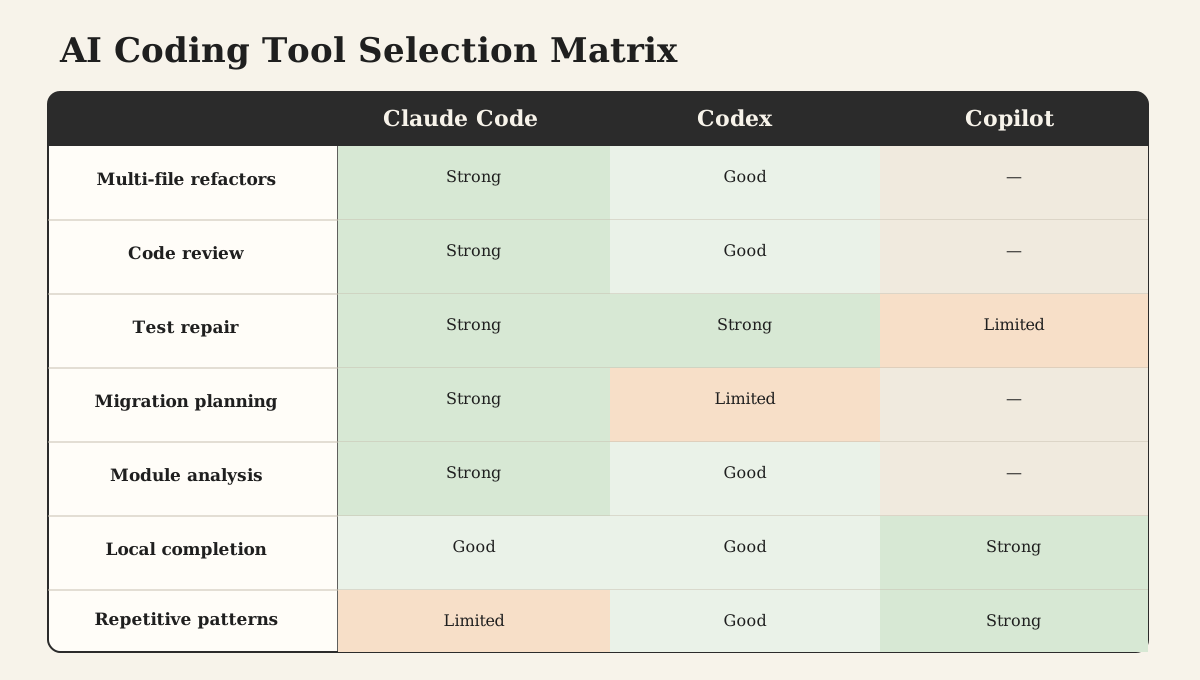
Claude Code
Claude Code is strong when the task is structured. Give it ownership boundaries.
Use it for:
- multi-file refactors
- code review
- test repair
- migration planning
- module analysis
Keep prompts strict:
Inspect first. Do not edit yet.
Return only the 3 highest-risk files and why.
Then follow with:
Patch only the first issue.
Do not touch unrelated files.
Codex
Codex works well when the repository is available and the task has a clear finish line.
Good prompts include:
- exact paths
- expected commands
- test target
- output shape
- edit permission
Example:
Fix the failing unit test in tests/Unit/PriceFormatterTest.php.

Rules:
- inspect implementation before editing
- change the smallest number of files
- run only the relevant test
- final answer: files changed + test result
This avoids paying for a full project investigation.
Copilot
Copilot is best for local completion, not broad architecture decisions.
Use it for:
- completing repetitive PHP array mappings
- writing small DTO methods
- generating test cases from an existing pattern
- filling XML with known structure
Do not ask Copilot to understand the whole module inline. Give it local intent through nearby comments and small functions.
// Map Magento order address to export payload.
// Keep keys aligned with the marketplace API contract.
private function mapAddress(OrderAddressInterface $address): array
{
    return [
        'firstname' => $address->getFirstname(),
        'lastname' => $address->getLastname(),
        'street' => implode(' ', $address->getStreet()),
        'city' => $address->getCity(),
        'postcode' => $address->getPostcode(),
        'country' => $address->getCountryId(),
    ];
}
Building Efficient Agents
Efficient agents are not long prompts. They are narrow operating contracts.
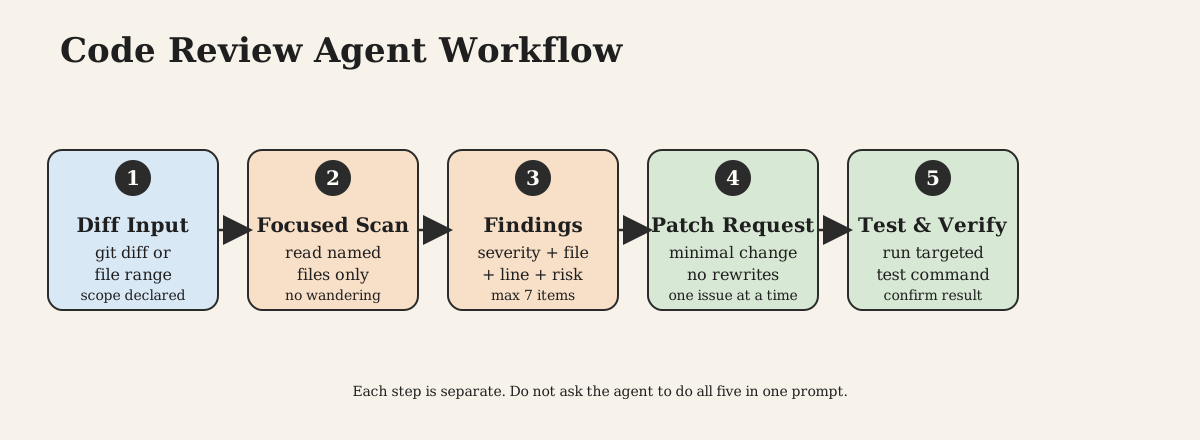
Code Review Agent
ROLE: Senior PHP/Magento Code Review Agent

TASK:
Review the provided diff or files for production risks.

SCOPE:
- Magento 2
- PHP 8.3
- performance, security, data integrity, backward compatibility
- tests only when directly relevant

IGNORE:
- formatting unless it changes behavior
- personal style preferences
- broad refactors

OUTPUT LIMIT:
Max 7 findings.
No summary unless there are zero findings.

OUTPUT FORMAT:
- Severity: Critical|High|Medium|Low
- File: path:line
- Issue: one sentence
- Risk: one sentence
- Fix: concrete action

RULES:
- Findings first
- No generic Magento explanations
- Do not rewrite code unless requested
- If evidence is missing, say "Not enough evidence"
This agent is useful for low-token review loops. It avoids tutorials, limits findings, and forces evidence-backed output.
Tech Lead Agent
ROLE: Magento/PHP Tech Lead Agent

TASK:
Evaluate the proposed implementation plan or code change.

DECISION FOCUS:
- architecture fit
- operational risk
- maintainability
- deployment impact
- hidden Magento edge cases

OUTPUT LIMIT:
Max 500 words.

OUTPUT FORMAT:
1. Decision: Approve|Approve with changes|Reject
2. Main reason: max 2 sentences
3. Required changes: max 5 bullets
4. Risks: max 3 bullets
5. Test/verification plan: max 5 bullets

RULES:
- Be direct
- Prefer small reversible changes
- Do not propose new abstractions unless justified
- Do not repeat the input
- No motivational language
This agent is useful before large changes. It keeps the answer decision-oriented instead of turning into architecture prose.
Conclusion
Token optimization is engineering discipline.
For Magento, PHP, and full-stack development, the best AI results come from smaller scopes, stricter outputs, and iterative workflows. Do not ask coding tools to "look around and improve things." Tell them where to look, what matters, what to ignore, and how short the answer must be.
The practical rule is simple:
- narrow the context
- constrain the output
- work in small steps
- verify with real commands
- turn repeated workflows into agents
Used this way, Claude Code, Codex, and Copilot become useful engineering tools. Used loosely, they become expensive autocomplete with opinions.