Magento Postmark Integration with Markdown-Powered Transactional Emails
Introduction
Transactional email is one of those areas where Magento looks simple until the store starts operating at scale.
Order confirmations, shipment updates, payment confirmations, password resets, stock alerts, invoices, credit memos, and custom operational emails all have to be reliable. They also need to be editable by non-developers, localized by store context, safe enough for email clients, and visible enough for support teams to debug when something goes wrong.
That is where Postmark becomes useful.
Postmark is focused on transactional delivery, templates, streams, message events, and deliverability tooling. In a Magento build, the value is not just "send email through another provider." The value is moving critical customer communication into a controlled delivery system while keeping Magento as the source of order, customer, store, and payment data.
The most interesting part of this implementation is the Markdown layer. Instead of forcing every editable content block to be raw email HTML, the module lets CMS content be authored as Markdown and then converts it into a controlled subset of email-safe HTML before it is sent to Postmark.
That gives the integration a practical shape:
- Magento owns business data and template variable assembly
- Postmark owns delivery and external email templates
- CMS blocks own editable content fragments
- Markdown gives content editors a safe authoring format
- custom renderers keep the generated HTML predictable for email clients
This article walks through that pattern.
What the Module Does
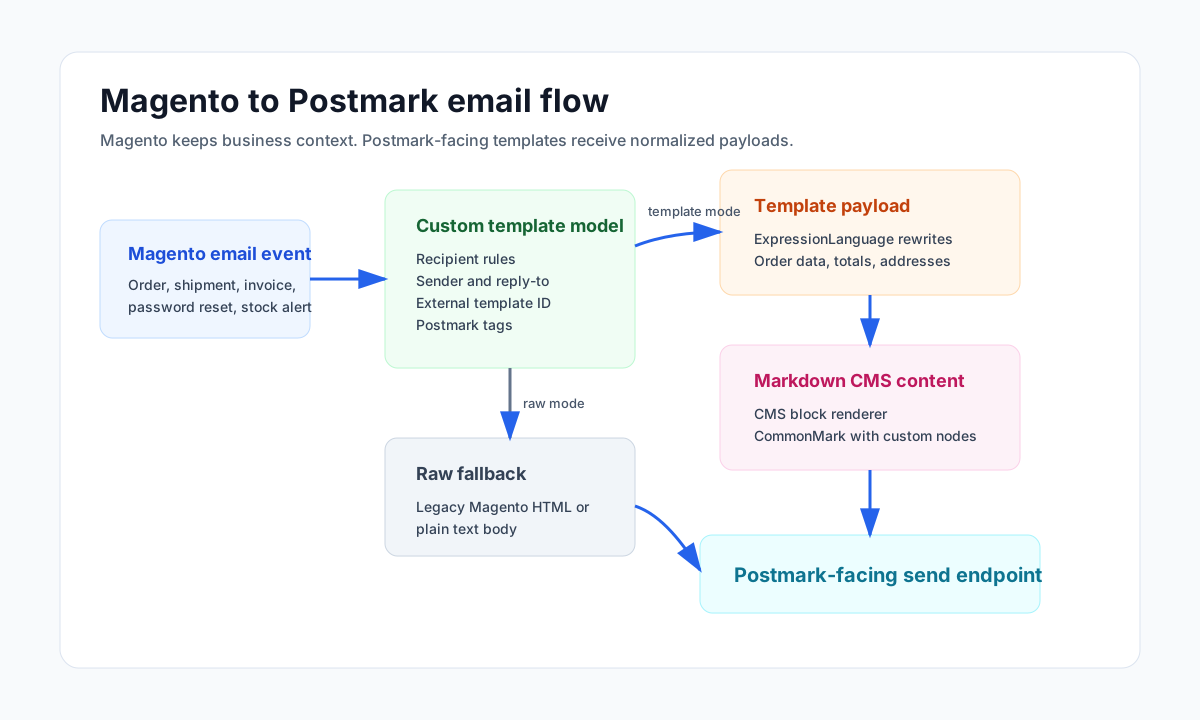
The module replaces Magento's default email template model with a custom implementation. That custom model still behaves like Magento email from the calling code's point of view, but the actual transport changes depending on the template.
There are two delivery modes.
The first mode is raw email delivery. If a Magento email template does not have an external template identifier, the module renders the Magento template normally, builds the subject and body, and sends a raw payload to the configured email endpoint.
The second mode is external template delivery. If the Magento template maps to an external template identifier, the module does not send Magento's rendered HTML body. Instead, it builds a structured templateParams payload and sends that payload with the external template ID. The external template system can then render the final email using the normalized data Magento provided.
That split is important during migrations. You can move transactional emails to Postmark one at a time without rewriting every legacy Magento email path on day one.
Architecture Overview
At a high level, the integration has four layers.
The first layer is Magento configuration. Admin configuration controls whether the Postmark path is enabled, where the email endpoint lives, which recipients are allowed during testing, which recipients are blocked, and which Markdown elements are allowed to emit HTML attributes.
The second layer is the rewritten email template model. It extends Magento's core email template model and becomes the decision point for recipient filtering, sender normalization, reply-to handling, template mode selection, Postmark tags, and transport selection.
The third layer is transport. The abstract transport reads the final Zend_Mail headers, recipients, attachments, subject, HTML body, text body, reply-to, CC, BCC, and Postmark tags. Concrete transports then decide whether the request is a raw email payload or a template payload.
The fourth layer is variable rendering. Template mode uses Symfony ExpressionLanguage to turn Magento objects into the nested variable structure expected by external templates. Custom renderers then format order items, addresses, totals, payment method titles, shipment tracking data, and CMS blocks.
The Markdown renderer sits inside that fourth layer. It is small, but it is the part that makes the email system maintainable for content-heavy templates.
graph TD
    A[Magento email event] --> B[Custom email template model]
    B --> C{External template ID?}
    C -->|No| D[Render Magento template HTML]
    D --> E[Raw transport payload]
    C -->|Yes| F[ExpressionLanguage variable rewrites]
    F --> G[Custom renderers]
    G --> H[Markdown CMS block renderer]
    H --> I[Template transport payload]
    E --> J[Postmark-facing endpoint]
    I --> J
    J --> K[Transactional email delivery]
Why Markdown Matters
Email HTML is not friendly to content editors.
It is verbose, fragile, and full of inline style decisions that should not be hand-edited inside Magento CMS blocks. At the same time, plain text is too limited for real transactional communication. Teams still need links, bold text, lists, paragraphs, small policy snippets, contact blocks, promotional copy, and occasionally images.
Markdown is a good middle ground. It lets a CMS block contain content such as:
**Payment reminder**

Please complete payment using the secure link below.

[View payment instructions](https://example.com/payment)

- Include your order number
- Use the billing name from checkout
- Contact support if the payment has already been sent
That is much easier to maintain than hand-authored email HTML. The challenge is that email cannot accept arbitrary Markdown output. The output needs to be constrained.
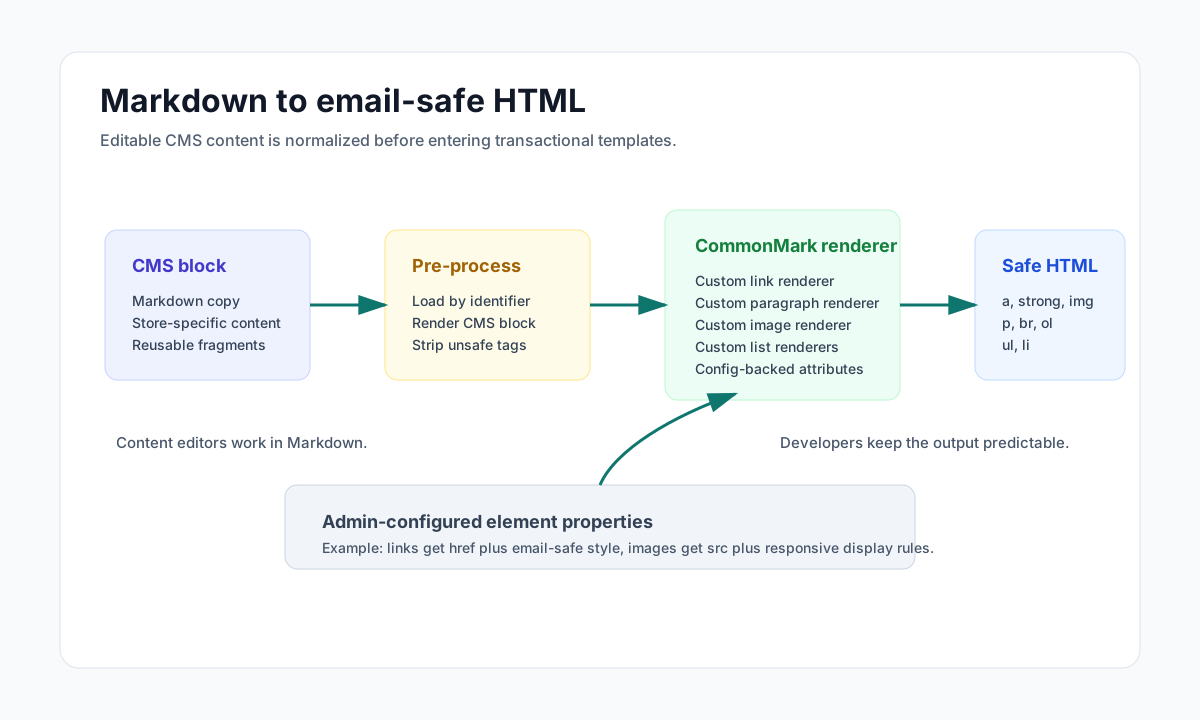
This module handles that in three steps.
First, CMS block content is loaded by identifier and store ID, so the email can pull the right localized or store-specific content fragment.
Second, the block content is stripped down and passed through League CommonMark, using the CommonMark core extension plus custom node renderers.
Third, the generated HTML is filtered to a small allowlist:
astrongimgpbrolulli
That keeps the authoring experience flexible without letting arbitrary CMS HTML leak into transactional emails.
Configurable Email-Safe Attributes
The strongest part of the Markdown implementation is not just that it converts Markdown to HTML. It lets the admin configuration define the allowed properties for each rendered element.
The module adds a Magento system configuration array field under Markdown settings. Each row has:
- an element name such as
a,p,img,ul, orli - a property string such as
style="...",class="...",href="", orsrc=""
The custom Markdown renderers read that configuration and apply the attributes when rendering each node. For links and images, the renderer replaces the configured placeholder with the actual Markdown URL.
That gives a practical email pattern:
element: a
properties: href="" style="color:#1f6feb;text-decoration:underline;"

element: p
properties: style="margin:0 0 16px;font-size:14px;line-height:22px;"

element: img
properties: src="" style="display:block;max-width:100%;height:auto;"
The editor writes Markdown. The developer controls the renderer. The admin can tune email-safe styles without editing PHP code.
This is a useful compromise for Magento stores because email markup often changes for brand, legal, localization, and deliverability reasons. Hardcoding every CMS fragment into templates slows that work down. Allowing raw HTML everywhere creates a different class of risk. Markdown plus configured renderers sits in the middle.
Template Variable Rewrites
Postmark templates usually want clean variable names. Magento email templates usually expose complex objects.
This integration bridges that gap through XML-driven variable rewrites. For each external template, the module defines the payload shape that should be sent to the template endpoint.
For example, an order-related template can map Magento order data into a nested structure:
[
    'order' => [
        'id' => $order->getId(),
        'incrementId' => $order->getIncrementId(),
        'date' => $createdAtLocal,
        'shippingAddress' => [
            'name' => $order->getShippingAddress()->getName(),
            'address' => $renderedShippingAddress,
        ],
        'products' => $renderedOrderItems,
    ],
    'totals' => $renderedTotals,
    'termsUrl' => $storeTermsUrl,
]
In the module, that shape is not hardcoded directly inside the transport. It is declared as template-specific rewrite configuration and evaluated with Symfony ExpressionLanguage.
The expression language is extended with helpers that are useful in Magento email contexts:
getStoreUrl()for store-aware linksformatPrice()for currency displaycreatedAtToLocal()for date formattingcustomRenderer()for order items, totals, CMS blocks, addresses, and trackingstripTags()andhtmlEntityDecode()for text cleanupcurrentYear()for footer contentgetStoreConfig()for config-backed variablestrans()for translated strings
This makes the transport layer cleaner. It does not need to know how every template is shaped. It only needs to load the external template ID, evaluate the configured payload, add default variables such as language, base URL, logo URL, and store flags, then send the result.
Recipient Safety During Rollout
Transactional email migrations are risky because a small mistake can email real customers from a staging or partially migrated environment.
The module handles that with whitelist and blacklist controls.
When a whitelist is configured, the module refuses to send to any recipient outside the allowed list. It also inspects BCC headers and removes BCC recipients that do not match the allowed patterns. That is especially useful when testing Magento emails that normally include operational inboxes, CRM addresses, or hidden copies.
The blacklist is a second control. If the recipient contains a configured blocked value, the module skips delivery.
If Postmark sending is disabled, the module returns success to Magento without sending. That is a pragmatic behavior: the business action should not necessarily fail just because outbound delivery is disabled in that environment.
For production, the same controls help with suppression use cases, test accounts, and bad recipient patterns.
Transport Payloads
The transport code uses Magento's existing Zend_Mail object as the source of truth. That is the right integration point because Magento core and third-party modules already know how to add recipients, sender data, reply-to, attachments, and headers there.
The abstract transport extracts:
tofromccbccreplyToattachments- Postmark tags
The raw transport adds:
subjectcontentTypecontent
The template transport adds:
templateIdtemplateParams
If the evaluated template params do not include a subject, the module falls back to Magento's processed subject.
That fallback matters. It lets external templates control subject lines when needed, while still keeping legacy Magento subjects working during transition.
CMS Blocks as Email Content Components
One of the most useful renderers is the CMS block renderer.
It receives a block identifier and store ID, loads the CMS block, renders it through Magento's CMS block system, and then passes the output through the Markdown processor. This allows email templates to include reusable content fragments such as:
- sales contact information
- trade desk contact information
- storage contact information
- payment instructions
- shipping policy snippets
- order promotion blocks
- carrier information blocks
That turns CMS blocks into controlled email components. Content teams can update operational copy in Magento Admin, while the renderer still protects the email template from arbitrary markup.
For transactional systems, that is a big maintenance win. Developers keep the structure and renderer rules. Operations teams can adjust copy without waiting for a deployment.
Practical Implementation Notes
There are a few details worth calling out if you build a similar Magento Postmark integration.
First, keep raw and template modes side by side. A hard migration from every Magento template to external templates creates too much risk. Let each template opt in with an external ID.
Second, do not pass Magento objects directly into external templates. Convert them into stable arrays with predictable names. External email templates should not know what a Magento order object looks like.
Third, treat CMS content as untrusted input. Even if only admins can edit CMS blocks, transactional email should still restrict output. Markdown helps because the renderer can control exactly which HTML elements and attributes are emitted.
Fourth, preserve Magento's normal email call path as much as possible. Rewriting the email template model and replacing the transport keeps the rest of Magento closer to its default behavior.
Fifth, make rollout controls part of the module, not an afterthought. Whitelists, blacklists, disabled-send mode, debug logging, and tag forwarding make the difference between a useful integration and a fragile one.
Platform-Agnostic Pattern
Although this implementation is Magento-specific, the same pattern works well in Magento 2, Laravel, Symfony, or a custom PHP commerce application.
In Magento 2, the same idea would move behind services, dependency injection, plugins or observers, and possibly message queues. Template variable rewrites could become configuration, view models, or dedicated payload builders.
In Laravel, the pattern maps cleanly to Mailable classes, queued jobs, Markdown parsing through a service, and a Postmark transport or API client. CMS block equivalents could be database-backed content fragments managed from Filament, Nova, or a custom admin.
In Symfony, the equivalent would use Messenger for async delivery, Symfony Mailer or an HTTP client for transport, Twig or external Postmark templates for rendering, and a Markdown service with strict output filtering.
The core idea stays the same: build a narrow email delivery boundary, normalize the data before sending, render editable content safely, and keep the provider-specific concerns out of the business workflow.
Conclusion
A Magento Postmark integration is not just an SMTP swap.
The valuable version is a transactional email architecture: Magento remains the system of record, Postmark handles delivery and template rendering, template payloads are normalized, rollout is controlled with recipient rules, and CMS-managed content is converted from Markdown into safe email HTML.
The Markdown layer is the piece that makes the system easier to operate over time. It gives content editors a clean authoring format, gives developers control over the generated markup, and avoids the long-term maintenance cost of raw email HTML inside CMS blocks.
For Magento stores with a large transactional email surface, that is the difference between sending emails through Postmark and actually owning the email architecture.