Building a QA Automation Agent with Playwright and Claude Code
Building a QA Automation Agent with Playwright and Claude Code
There is a certain moment every Magento developer knows. A deployment goes out, someone manually clicks through the checkout on staging, everything looks fine. Three hours later a client calls because guest checkout on mobile is broken in production.
Manual QA scales badly. It is not that the people doing it are careless. It is that humans checking the same flows repeatedly lose focus, miss edge cases on different devices, and cannot be everywhere at once. On any reasonably complex ecommerce build — multiple storeviews, configurable products, custom checkout steps, third-party payment integrations — the surface area for regression is enormous.
Automated browser testing is the obvious answer, but writing and maintaining Playwright tests has always required enough engineering time that it either gets done poorly or gets skipped entirely. The feedback loop between "something broke" and "a test exists that catches it" stays too long.
What changed recently is that Claude Code, running as a local agent, can generate, debug, and extend those tests in a practical way. Not as a replacement for engineering judgment, but as a force multiplier that closes that gap.
This is how to set it up.
Why Manual QA Becomes Painful at Scale
On a simple Magento store with one storeview, one payment method, and a standard checkout flow, manual QA is manageable. Everything changes when you add:
- Multiple storeviews or websites with different configurations
- Configurable and grouped products with complex add-to-cart logic
- Custom checkout steps, order attributes, or delivery date pickers
- B2B functionality with company accounts and quote workflows
- Third-party modules that touch the same checkout events from five different angles
A release that changes one observer can silently break something three modules away. Unless you have a test that actually runs the flow end to end, you may not find out until a customer does.
The other problem is deployment cadence. When you are deploying every week or every two weeks, the economics of manual regression testing get brutal. Fifteen flows, fifteen minutes each, two environments — that is hours of work that produces no code. Automate it once and it pays back on the second run.
What Playwright Actually Is
Playwright is a browser automation library from Microsoft. It controls Chromium, Firefox, and WebKit through a proper API, not by injecting JavaScript into the page and hoping for the best. It handles:
- Navigation, clicking, filling forms
- Waiting for elements, network requests, and page transitions
- Screenshots and video recording on failure
- Multi-tab and multi-context sessions
- Network interception (useful for mocking payment responses)
The important thing for Magento work is that Playwright has serious waiting mechanics. You can wait for a specific element to appear, for a network request to complete, for a loading spinner to disappear. This matters because Magento's frontend — especially checkout — is full of sequential AJAX calls and DOM mutations that naive automation falls over.
Keep the Playwright setup isolated from your Magento Composer project. The cleanest structure:
project-root/
├── app/
├── vendor/
├── pub/
└── e2e/
    ├── tests/
    ├── node_modules/
    ├── playwright.config.ts
    ├── package.json
    ├── test-env.ts
    ├── .env.local
    ├── .env.staging
    └── .env.production
This keeps Node/NPM completely separate from Magento, makes the suite portable between projects, and gives Claude a clear scope when you ask it to work on tests.
Installing inside the e2e/ directory:
mkdir e2e && cd e2e
npm init -y
npm install -D @playwright/test dotenv
npx playwright install chromium
Create e2e/.gitignore immediately:
node_modules
playwright-report
test-results
.env.*
Never commit .env.* files. Staging URLs, admin credentials, and especially payment test cards should stay off version control entirely.
What Claude Code Actually Is
Claude Code is Anthropic's CLI tool that runs as an agent in your terminal. It reads files, executes commands, browses the web, and works inside your project directory with access to your actual codebase.
The difference between Claude Code and a chat interface matters here. When you paste a test that is failing into a chat window, you are doing the work of translating context — extracting the relevant bits, describing the error, pasting code back and forth. Claude Code runs in your repo. It can read the test file, read the Playwright config, run the test itself, see the actual error output, and propose a fix based on all of that at once.
For QA work specifically, this means you can describe a user flow in plain language and get a working test as a starting point. When that test breaks because a Magento upgrade changed a selector, you can ask Claude to fix it with the full context of what the test is supposed to do.
MCP Explained Simply
The AI industry has a habit of wrapping simple ideas in enterprise-grade terminology. MCP is one of them. Here is what it actually is:
MCP = a way for Claude to use tools.
Without MCP, Claude only talks. It explains, suggests, writes code — but it cannot actually do anything.
With MCP, Claude can act.
Think of it this way:
- Claude = the brain
- MCP = hands and eyes
- Playwright = the browser robot
Without MCP, the workflow is manual:
- You write the test
- You run it
- You see the error
- You paste it to Claude
- Claude suggests a fix
- You apply it
- You run it again
With MCP, Claude runs the whole loop:
- Opens the browser
- Navigates to your Magento checkout
- Clicks through the flow
- Sees the error directly
- Reads the console
- Fixes the selector
- Reruns and confirms
The name "Model Context Protocol" just means "a protocol that gives the AI model context and tools." That is it. It is an adapter layer between Claude and external systems — the terminal, the filesystem, the browser, Docker, Git, GitHub.
Important: MCP is not Playwright. People mix these up. Playwright is the browser automation tool. MCP is what lets Claude drive Playwright instead of you driving it manually.
| Without MCP | With MCP | |
|---|---|---|
| Claude opens a browser | No | Yes |
| Claude reads test errors | You paste them | Directly |
| Claude fixes and reruns | You do it | Automated |
| Claude takes screenshots | No | Yes |
| Claude reads console output | You copy it | Directly |
The most useful MCP servers for ecommerce QA work:
| MCP Server | What it gives Claude |
|---|---|
| Playwright MCP | Control a real browser |
| Filesystem MCP | Read/write project files |
| Terminal MCP | Run composer, bin/magento, npm, phpunit |
| GitHub MCP | Read PRs, commits, issues |
For Playwright testing, the relevant one is @executeautomation/playwright-mcp-server:
npm install -g @executeautomation/playwright-mcp-server
claude mcp add playwright -- npx -y @executeautomation/playwright-mcp-server
After this, when you ask Claude Code to "open the checkout on staging and see what happens after adding a configurable product," it actually does that rather than theorising about it.
Building the First Smoke Test
Start with the checkout happy path. If this breaks, everything else is secondary.
Create e2e/tests/checkout.spec.ts:
import { test, expect } from '@playwright/test';

test('guest checkout - simple product', async ({ page }) => {
  await page.goto('/');

  // Add a simple product to cart
  await page.goto('/some-product.html');
  await page.click('#product-addtocart-button');
  await page.waitForSelector('.message-success');

  // Go to checkout
  await page.goto('/checkout');
  await page.waitForSelector('#checkout', { state: 'visible' });

  // Wait for shipping step to load (Magento renders this via AJAX)
  await page.waitForSelector('[data-ui-id="checkout-step-shipping"]', {
    state: 'visible',
    timeout: 15000,
  });

  // Fill shipping address
  await page.fill('[name="firstname"]', 'Test');
  await page.fill('[name="lastname"]', 'User');
  await page.fill('[name="street[0]"]', '123 Test Street');
  await page.fill('[name="city"]', 'London');
  await page.fill('[name="postcode"]', 'SW1A 1AA');
  await page.selectOption('[name="country_id"]', 'GB');

  // Select first available shipping method
  await page.waitForSelector('.table-checkout-shipping-method tbody tr', {
    timeout: 10000,
  });
  await page.click('.table-checkout-shipping-method tbody tr:first-child input');

  // Next: Payment
  await page.click('[data-role="opc-continue"]');
  await page.waitForSelector('[data-ui-id="checkout-step-payment"]', {
    state: 'visible',
    timeout: 10000,
  });

  // Verify we reached the payment step
  await expect(page.locator('[data-ui-id="checkout-step-payment"]')).toBeVisible();
});
This is a smoke test, not a full checkout. It verifies that the path to payment is intact. For actual order placement you need to either mock the payment or use a test account with a real payment sandbox — which is a separate problem.
Run it from inside the e2e/ directory:
cd e2e
npx playwright test tests/checkout.spec.ts --headed
The --headed flag is important when writing tests. Watch the browser. When it fails, you see exactly where it gets stuck. When you run in CI, drop that flag.
Using Environment Configs
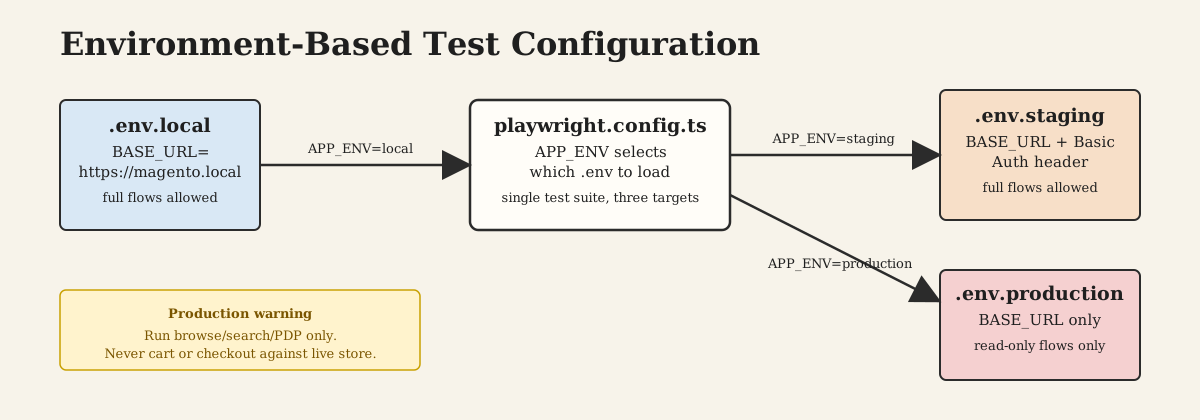
A test that only runs against one URL is a test that gets ignored. You need to be able to run against local, staging, and production (read-only) without changing code.
playwright.config.ts:
import { defineConfig } from '@playwright/test';
import * as dotenv from 'dotenv';

// Load environment-specific config
dotenv.config({ path: `.env.${process.env.APP_ENV || 'local'}` });

export default defineConfig({
  use: {
    baseURL: process.env.BASE_URL,
    extraHTTPHeaders: {
      // Bypass staging HTTP auth if needed
      ...(process.env.STAGING_AUTH
        ? { Authorization: `Basic ${process.env.STAGING_AUTH}` }
        : {}),
    },
  },
  timeout: 30000,
  retries: process.env.CI ? 2 : 0,
});
.env.local:
BASE_URL=https://magento.local
.env.staging:
BASE_URL=https://staging.example.com
STAGING_AUTH=dXNlcjpwYXNz
.env.production:
BASE_URL=https://example.com
Running against staging:
APP_ENV=staging npx playwright test
Note on production testing: Run only read-only flows against production — category browsing, product pages, search. Never run cart or checkout flows against production unless you have a dedicated test account with a confirmed safe payment method. One accidental order is enough to make this policy non-negotiable.
Turning Automation into a QA Agent
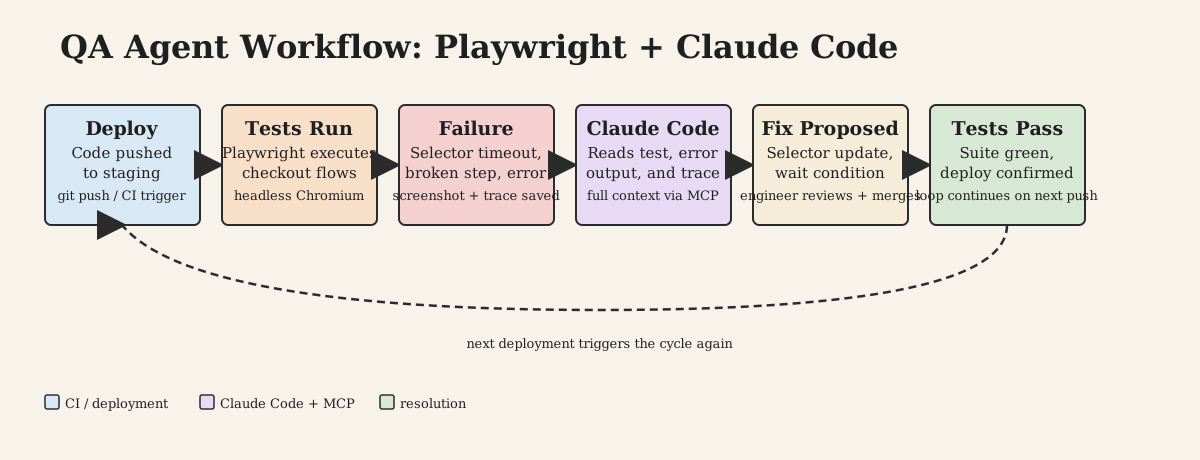
Once your Playwright tests are in place, Claude Code stops being just a test generator and starts being something more useful: a debugging assistant that can run the tests, see what broke, and propose fixes with full context.
Here is the difference in practice:
| Standard Playwright | Playwright + Claude Code | |
|---|---|---|
| Writing a new test | Manual, from scratch | Describe the flow, Claude generates a starting point |
| Debugging a failure | Copy error, paste to chat, apply fix manually | Claude reads the error, trace, and test — proposes fix in context |
| Fixing a broken selector | Find it manually in DevTools | Claude opens the browser, inspects the element, updates the test |
| Extending coverage | Write each test case yourself | Describe what to test, Claude adds it |
| Understanding a failure | Read trace files, debug manually | Claude reads the trace and explains what happened |
| Maintenance after module install | Manual review of all affected tests | Claude can scan for selectors that changed |
The workflow in practice:
- A test fails in CI or locally after a deployment.
- You open Claude Code in the
e2e/directory. - You say: "The checkout smoke test is failing after the latest deploy, here is the output."
- Claude reads the test, the config, the error, and runs the test itself via MCP if needed.
- It proposes a targeted fix — a selector change, a missing wait, a timing issue.
This is not magic. The value is that Claude holds the full test file in context while diagnosing the failure. It is better at pattern-matching "this error means a loader is still present when we try to click" than you are when you are tired and have three other things to fix.
You can also ask Claude to extend coverage by describing flows in plain language:
"Add a test that verifies that logged-in customers can reorder from their order history page."
The resulting test will not be perfect on the first try. Expect to correct selectors. But it is faster than writing it from scratch, especially when the page structure is already in your repo and Claude can read it.
Real-World Magento Problems
There is no honest article about Magento browser automation that does not list the ways it will break you.
Flaky selectors. Magento's checkout DOM changes between versions, between patches, and between third-party modules. A module that adds an extra step to checkout will shift every selector that depends on step numbers. Use data attributes where you can (data-role, data-ui-id) instead of CSS class chains. When modules do not provide stable attributes, you are stuck with fragile selectors until someone adds them.
Dynamic checkout. The checkout is a Knockout.js application, not a static page. Steps load asynchronously. Shipping methods load after the address is submitted. Payment methods render after shipping is selected. Any test that moves too fast will fail with "element not found" errors because the element genuinely is not there yet. waitForSelector with a reasonable timeout is not optional.
Payment iframes. Stripe, Adyen, Mollie, Klarna — they all render inside iframes loaded from a third-party domain. Playwright can interact with iframes, but cross-origin iframes with CSP restrictions make full end-to-end payment testing difficult. The practical solution is to mock the payment at the network level for most tests and maintain separate manual tests against the payment sandbox for the actual payment flow.
Loaders and spinners. Magento loves loading overlays. If you click during an overlay, the click either gets blocked or registers on the overlay itself. The pattern is: wait for the loader to disappear before interacting. Playwright's waitForSelector(..., { state: 'hidden' }) handles this.
CSP and WAF. Some production WAF configurations will block Playwright's requests because the user agent or request pattern looks like automation. On staging, confirm your WAF rules are not interfering before concluding your tests are broken.
Module conflicts. A third-party module can override checkout steps, rebind Knockout components, or add AJAX calls that delay rendering. When a test breaks after installing a module, start with the assumption that it changed the DOM or the timing, not that your test was wrong.
What This Actually Saves
A checkout smoke test that runs in two minutes catches the most expensive class of regressions: broken cart flow, broken checkout, broken order confirmation. Those are the failures that generate support calls and chargebacks.
A full regression suite covering the main storeviews, product types, and account flows runs in fifteen to twenty minutes on a modern machine. Unattended. Without someone manually clicking through it for the fourth time this month.
Claude Code reduces the barrier to writing and maintaining that suite. Not to zero — you still need to understand the tests, review what it generates, and debug what it cannot. But the feedback loop between "I need a test for this flow" and "there is a test for this flow" gets short enough that it actually happens.
For Magento specifically, where manual regression is genuinely painful due to the complexity of the frontend, that is a meaningful change.
The tooling is practical enough to use now. Playwright is mature. Claude Code is good at reading and writing tests. MCP integration works. The hard part is not the setup — it is writing enough tests to cover what actually breaks in your specific project, which nobody can do for you.
Start with checkout. Run it on every deploy. Go from there.