Building a PHP GPX Toolkit for Route and Training Analysis
GPX files look simple until you try to build useful software around them.
At first, a GPX file is just XML with latitude, longitude, elevation, timestamps, and maybe a few waypoints. Then real activity files enter the system: Garmin exports with heart-rate extensions, Strava routes with tens of thousands of points, Komoot tracks with inconsistent metadata, missing timestamps, noisy elevation, and route files that are not really activities at all.
That is where a small script stops being enough.
I recently worked on a PHP GPX toolkit that started from a direct need: inspect trail-running routes, calculate realistic distance and elevation stats, remove unnecessary sensor data, simplify routes for web usage, and identify nearby route features such as peaks, settlements, rivers, and lakes.
The interesting part was not parsing XML. The interesting part was shaping the code so it could work as a plain PHP package, a CLI tool, and a reusable library inside larger Laravel, Symfony, or Magento applications.
The Problem With One-Off GPX Scripts
The fastest way to analyze a GPX file is a single procedural script.
Load the XML. Loop over <trkpt> nodes. Calculate distance between consecutive points. Print elevation gain. Call a geocoding API for every few kilometers. Done.
That works for the first route.
It breaks down when the requirements grow:
- activity files need heart rate, cadence, temperature, and power data
- route templates need timestamps and private sensor data removed
- web maps need 500 points, not 50,000
- trail routes need elevation gain with GPS noise filtered out
- training summaries need different rules for running, cycling, hiking, and skiing
- OpenStreetMap APIs need rate limiting and caching
- unit tests must not call external services
At that point, the script has too many responsibilities. It is not a tool anymore. It is a pile of decisions.
The better direction is a small package with clear boundaries.
Core Package Shape
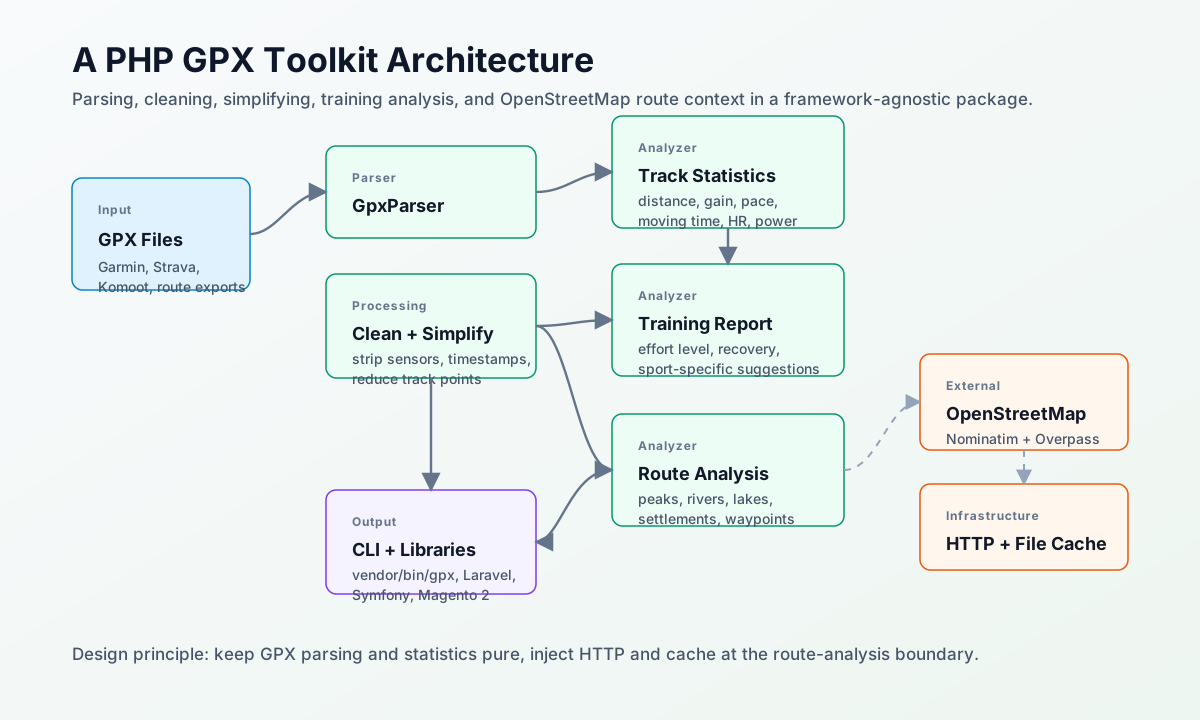
The package is organized around a simple pipeline:
GPX file
  -> parser
  -> value objects
  -> processors
  -> analyzers
  -> writer / CLI / framework integration
The code is split into focused areas:
src/
  Parser/
    GpxParser
    GpxWriter

  Processor/
    GpxCleaner
    GpxSimplifier

  Analyzer/
    TrackStatsCalculator
    TrainingAnalyzer
    RouteAnalyzer

  External/
    Nominatim/
    Overpass/

  Cache/
    CacheInterface
    FileCache
    NullCache

  Http/
    HttpClientInterface
    CurlHttpClient

  Data/
    ParsedGpx
    TrackPoint
    Waypoint
    TrackStats
    TrainingReport
    RouteAnalysis
    Sport
    EffortLevel
That structure matters because GPX work has two very different kinds of logic.
Parsing, cleaning, simplification, and statistics are deterministic. They should be pure, fast, and easy to test.
Route enrichment is different. It talks to external APIs, deals with rate limits, cache misses, incomplete OpenStreetMap data, and network failures. That belongs behind injected HTTP and cache interfaces.
Keeping those worlds separate makes the package much easier to reason about.
Parsing GPX Into Value Objects
The parser reads GPX 1.1 files and turns them into typed PHP objects:
$gpx = (new GpxParser())->parseFile('track.gpx');

echo $gpx->name;
echo count($gpx->track);
Each track point carries the expected geometry fields:
new TrackPoint(
    lat: 44.0606380,
    lon: 19.9084890,
    ele: 487.2,
    time: $time,
    heartRate: 148,
    cadence: 80,
    temperature: 28.0,
    power: null,
);
The parser supports regular track points, route points, waypoints, timestamps, elevation, and Garmin TrackPointExtension data.
The value-object approach is important. GPX XML is flexible, but application code should not have to carry SimpleXMLElement around. Once the file is parsed, the rest of the package works with explicit PHP objects.
That makes later operations safer:
TrackStatsCalculatordoes not care about XML namespacesGpxCleanerdoes not need to know where Garmin stores heart rateGpxWritercan serialize a clean object model back to GPX- tests can build small synthetic tracks without loading real XML files
Cleaning Activity Data
Recorded activities often contain more data than you want to publish.
A race route or trail guide usually does not need heart rate, cadence, temperature, power, or original timestamps. Sometimes you want the geometry only: latitude, longitude, and elevation.
The cleaner handles that with explicit operations:
$cleaner = new GpxCleaner();

$route = $cleaner->stripExtensions($gpx);
$route = $cleaner->stripTimestamps($route);
$route = $cleaner->trackOnly($route);
There is also a stricter geometry-only mode:
$minimal = $cleaner->geometryOnly($gpx);
The important design choice is immutability. Cleaning operations return new instances. They do not mutate the original parsed GPX object.
That is a small choice, but it avoids a common source of bugs in command-line tools: one operation silently changes the object that another operation expected to remain intact.
Simplifying Dense Tracks
Real activity files can be huge.
A high-resolution trail run can easily contain 50,000 points. That is fine for archival data, but too much for a web map, preview image, database field, or API response.
The simplifier supports two practical modes:
$simple = $simplifier->byMinDistance($gpx, minDistanceM: 10.0);
$simple = $simplifier->byMaxPoints($gpx, maxPoints: 500);
The first removes over-sampled points by distance. The second targets a specific point count using even spacing.
For this kind of utility, predictable behavior is more important than algorithmic cleverness. Start and end points are always preserved. Metadata and waypoints carry over. The output should be boring in the best possible way.
Calculating Track Statistics
The statistics layer calculates:
- distance
- elevation gain and loss
- min and max elevation
- duration
- moving time
- pace
- speed
- average and max heart rate
- average power
- average temperature
Distance uses haversine calculation between consecutive points. Elevation gain uses a configurable noise threshold so tiny GPS fluctuations do not inflate the result.
That threshold matters. Without it, a route with messy GPS elevation can look much harder than it is.
$stats = (new TrackStatsCalculator(elevationNoiseM: 5.0))->calculate($gpx);

echo $stats->distanceKm;
echo $stats->elevationGainM;
echo $stats->avgPaceFormatted();
Moving time is calculated from timestamped segments and excludes stopped segments. That gives a more useful training metric than raw elapsed time for many activities.
The calculator is deliberately independent from route enrichment, HTTP clients, or framework code. It should be possible to test it with a small fixture and no network.
Training Analysis
Training analysis sits on top of track statistics.
It classifies effort and produces suggestions based on:
- sport type
- distance
- elevation density
- duration
- heart-rate data when available
- temperature when available
The effort model is intentionally rule-based. It does not need an external AI service or a training platform API to say whether a route was recovery, easy, moderate, hard, very hard, or race-level.
$sport = Sport::fromGpxType($gpx->type);
$report = (new TrainingAnalyzer())->analyze($stats, $sport);

echo $report->effortLevel->value;
echo $report->summary;
Heart-rate data changes the classification when it exists. Without heart rate, the analyzer falls back to an equivalent flat-distance model where elevation gain increases the effective load.
This is not meant to replace a coach. It is meant to give a useful first-pass interpretation of a GPX activity or route.
Route Features With OpenStreetMap
The route analyzer adds geographic context.
It uses:
- Nominatim reverse geocoding for settlements along the route
- Overpass API for natural features such as peaks, rivers, streams, and lakes
- disk cache for repeated analysis
- HTTP abstraction so tests and frameworks can replace cURL
The workflow is:
$analyzer = new RouteAnalyzer(
    intervalKm: 2.0,
    peakRadiusM: 200.0,
    cache: new FileCache('/tmp/gpx-cache/nominatim'),
);

$route = $analyzer->analyze($gpx);
Nominatim is sampled every few kilometers instead of called for every point. That keeps API usage reasonable and respects the service's usage policy.
Overpass is used differently. Instead of many small calls, the analyzer builds one bulk query around sampled route coordinates, then post-filters peaks by distance to the actual track.
That post-filtering is important. A wide Overpass query catches candidates, but the package still needs to reject peaks that are not close enough to the route.
The result is a route summary like:
Peaks:
  Bobija
  Kozomor

Rivers & streams:
  Trešnjica
  Sušica

Villages:
  Gornje Košlje
  Svojdrug
That kind of context is useful for race previews, trail guides, route cards, and post-activity reports.
CLI as a Product Surface
A library is useful, but a CLI makes it immediately usable.
The package exposes commands like:
vendor/bin/gpx parse track.gpx
vendor/bin/gpx stats track.gpx --sport=trail_running
vendor/bin/gpx clean track.gpx --geometry-only --out=route.gpx
vendor/bin/gpx simplify track.gpx --max-points=500 --out=simple.gpx
vendor/bin/gpx analyze track.gpx --cache-dir=./cache/nominatim
This is more than developer convenience. A CLI is a good pressure test for package design.
If the CLI command has to know too much about XML, HTTP, cache formats, or data structures, the library boundary is wrong. If the CLI can compose parser, processor, analyzer, and writer classes cleanly, the package is probably shaped well.
Framework-Agnostic by Default
The package should work in plain PHP first.
That means no Laravel facades in src/, no Symfony container assumptions, no Magento object manager calls, and no framework-specific filesystem APIs.
Frameworks can still integrate it easily:
$this->app->singleton(RouteAnalyzer::class, fn() => new RouteAnalyzer(
    cache: new FileCache(storage_path('gpx/nominatim')),
));
The same idea works in Symfony services or Magento 2 dependency injection. The package exposes normal PHP classes with constructor-injectable collaborators.
That is the right tradeoff for a utility library. Framework integration should be a thin layer around a portable core.
Testing Strategy
The unit tests focus on deterministic behavior:
- haversine distance math
- GPX parsing
- GPX writing and round-trips
- cleaner immutability
- simplification edge cases
- track statistics
- training effort classification
- sport detection
- place classification
No unit test should call Nominatim or Overpass.
External API behavior belongs behind fake HTTP clients and cached fixtures. That keeps the test suite fast, stable, and respectful of public API limits.
For manual testing, real files are still useful. A long mountain race GPX file will reveal problems that synthetic fixtures never catch: noisy elevation, weird timestamps, huge point counts, bad metadata, and unexpected OpenStreetMap coverage.
The important part is separating those two feedback loops. Unit tests should be deterministic. Manual route analysis can be exploratory.
What I Would Improve Next
The package is already useful, but there are clear next steps.
First, add a dedicated RouteAnalyzer test using fake Nominatim and Overpass responses. The route layer is the riskiest part because it combines sampling, HTTP, caching, classification, and deduplication.
Second, decide what to do with the original standalone analyzer script. If it is still useful as a playground, keep it outside the package path or document it as a development tool. If not, move the remaining useful behavior into the library and remove the script.
Third, add stronger output formats to the CLI. Plain text is good for humans, but JSON output would make the tool much easier to use from CI jobs, dashboards, import pipelines, and route publishing workflows.
Fourth, treat large real-world GPX files as performance fixtures. Simplification, Overpass query size, and memory usage all matter once files reach tens of thousands of points.
The Bigger Lesson
The interesting engineering lesson is that GPX processing is not one problem.
It is several smaller problems that should not be mixed:
- XML parsing
- data normalization
- privacy cleanup
- geometry simplification
- statistical analysis
- training interpretation
- geographic enrichment
- CLI presentation
- framework integration
Once those responsibilities are separated, the code becomes easier to test and easier to reuse.
That is the difference between a script that answers one question once and a toolkit that can keep growing.
The source code is available on GitHub: beljic/gpx-tools.