How to Train a Claude Code Agent to Follow Your Coding Standards
AI coding agents do not become useful because they know PHP, Magento, Laravel, or JavaScript in the abstract.
They become useful when they understand the rules of the repository in front of them.
That distinction matters. A generic Claude Code session can write clean PHP. It can explain SOLID. It can refactor a class. But in a mature production codebase, "clean" is not enough. The agent also needs to know what must not be broken, which legacy patterns are intentional, which ones should be modernized, where strict typing is safe, and which business flows require extra caution.
This is where project instructions and Agent Skills become valuable. Instead of repeating the same prompt every time, you turn your engineering standards into a reusable operating layer for Claude Code.
The goal is not to make Claude blindly enforce a style guide. The goal is to teach it how a senior engineer should behave inside this codebase.
How Claude Code Agents Work
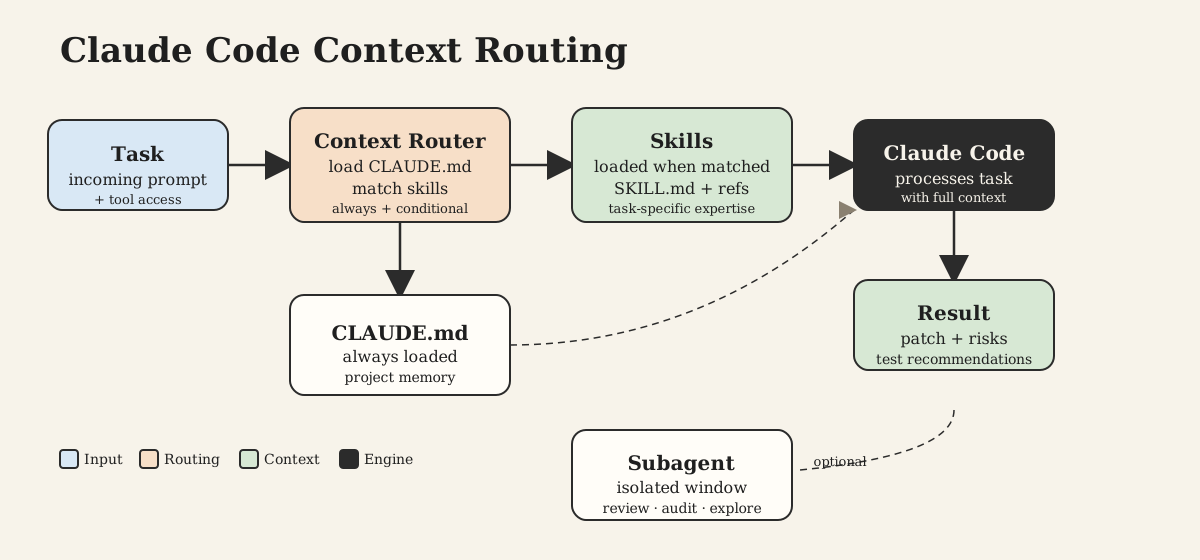
Claude Code is an agentic coding tool. It does not only answer questions. It can inspect files, search the repository, edit code, run commands, and use project-specific context while working through a task.
In practice, a Claude Code workflow usually has four layers:
- Memory files:
CLAUDE.mdfiles that describe project context, architecture, commands, conventions, and team rules. - Settings: JSON configuration that controls permissions, environment behavior, allowed tools, and safety boundaries.
- Subagents: specialized agents with their own prompts, tool access, and context windows.
- Skills: reusable capability folders that Claude can load when a task matches their description.
The important architectural idea is context routing.
You do not want every instruction loaded into every interaction. A frontend task does not need the full database migration policy. A payment bug does not need copywriting rules. A PHP modernization task does need coding standards, compatibility warnings, test expectations, and known high-risk flows.
Skills help with that. They let you package a specific body of expertise so Claude can pull it in when relevant instead of carrying every rule in the main prompt.
Why Coding Standards Belong in a Skill
Most teams start by putting coding standards into a large prompt:
Use PHP 8.5. Follow PSR-12. Use strict types. Apply SOLID. Be careful with Magento 1. Do not break XML config. Add tests.
That is better than nothing, but it does not scale.
The prompt gets copied between sessions. Different developers edit it. Important warnings get lost. The agent remembers the headline but misses the operational nuance. Eventually the instruction becomes either too short to be useful or too long to be read reliably.
A skill gives the standards a home.
For a project, the shape is usually:
.claude/
  CLAUDE.md
  skills/
    project-developer/
      SKILL.md
      references/
        coding-standards.md
        testing-guide.md
        architecture-notes.md
SKILL.md is the entry point. It tells Claude when the skill applies and how to use the supporting files. The detailed standards can live in references/coding-standards.md, where they are easier to review, version, and improve.
That separation is useful. The skill description stays short and discoverable. The reference file can be detailed enough to guide real code changes.
What the Skill Should Teach
A useful coding standards skill should answer the same questions a senior engineer would ask before changing production code.
What runtime are we targeting?
If the project runs on PHP 8.5, the agent should not write PHP 7-compatible code out of habit. It should fix deprecated patterns, prefer current syntax where it improves readability, and treat type errors as signals instead of annoyances.
What style is expected?
If the team follows PSR-12, say that directly. Also say how to apply it in legacy files. Reformatting an entire 1,500-line class because one method changed is usually review noise. Applying PSR-12 to touched code is practical.
How strict should typing be?
This is where many vague standards fail. "Use strict typing" is not enough. A better instruction is:
Use declare(strict_types=1) by default in new and modified PHP files.
Add scalar and return types where safe.
Prefer explicit nullable types over implicit mixed behavior.
When strict types expose invalid coercion, fix the caller instead of weakening the type unless compatibility requires it.
That tells the agent how to behave when strict typing creates friction. Without that rule, the agent may remove types to make tests pass. With the rule, it treats the failure as a modernization opportunity.
What must remain compatible?
Legacy systems often have public surfaces that are not obvious from the class itself: XML configuration, observers, cron entry points, templates, admin routes, integration callbacks, and overridden framework classes.
The agent needs explicit rules:
- Preserve framework-facing public method signatures unless intentionally refactoring.
- Do not break XML or config-driven class resolution.
- Keep template-facing model accessors stable.
- Modernize internal logic more aggressively than integration boundaries.
- Isolate legacy behavior behind typed helpers or service classes where practical.
This is the difference between useful modernization and a patch that looks clean but breaks production.
Turning Standards Into Agent Instructions
Here is a practical SKILL.md skeleton for a coding standards skill:
---

name: php-modernization
description: Use this skill when editing or reviewing PHP code in this project, especially modernization, refactoring, strict typing, framework compatibility, or coding-standard work.

---

# PHP Modernization Skill

When this skill applies, read `references/coding-standards.md` before editing PHP code.

Follow these priorities:

1. Preserve production behavior and framework integration points.
2. Target the configured PHP runtime.
3. Apply PSR-12 to touched code.
4. Use strict typing and explicit types where safe.
5. Improve structure incrementally.
6. Call out compatibility risks and manual test areas.

Do not perform broad rewrites unless explicitly requested.
Then put the real engineering policy in references/coding-standards.md.
A strong reference file should be specific. For example:
# Coding Standards

Target PHP 8.5.

Use `declare(strict_types=1);` in every new or modified PHP file unless a documented compatibility issue prevents it.

Follow PSR-12. In legacy files, format touched code only unless the task is an explicit cleanup pass.

Prefer:

- scalar and return types
- typed properties
- explicit nullable types
- early returns over nested conditionals
- constants over magic strings
- focused services over large procedural methods
- specific exceptions over broad catches

Be careful with:

- checkout
- payment
- shipment
- invoice
- cron
- observers
- API synchronization
- framework class overrides

When modifying code, explain:

1. what changed
2. compatibility risks
3. tests run
4. manual testing recommended
This is not just documentation. It is operational guidance for the agent.
Be Explicit About Legacy Boundaries
The strongest coding-agent instructions are not only aspirational. They include friction.
For example, a legacy PHP application may be moving toward strict typing, but still contain older framework APIs that return mixed, use magic data objects, or rely on string-based class resolution. If the skill says only "modernize aggressively," the agent may create technically nice code that does not survive the framework.
Better standards name the boundary:
Internal logic should be modernized confidently.
Framework-facing entry points should be changed conservatively.
That single distinction prevents a lot of bad patches.
Inside a new service class, constructor property promotion, readonly value objects, enums, match, and explicit return types may be completely reasonable. Inside an old observer method called by framework event XML, preserving the expected signature may matter more than making the method look modern.
Good agent instructions teach that judgment.
Tell Claude What Good Output Looks Like
Coding standards should also define the agent's response style after a patch.
This is easy to underestimate. If the agent changes a payment observer, a shipment export, or an API sync class, the final answer should not be a cheerful summary. It should tell the reviewer what changed, what could break, and what was tested.
For example:
When modifying code:

- briefly explain what changed
- mention compatibility risks
- mention where manual testing is recommended
- prefer focused patches over unnecessary rewrites
- do not hide TypeErrors by weakening types without explanation
This makes the agent more reviewable. It also trains the workflow around production risk instead of code aesthetics.
How to Add Skills to Claude Code
Claude Code discovers skills from skill folders. A project skill usually lives inside the repository:
.claude/skills/my-skill-name/SKILL.md
A personal skill lives in your user profile:
~/.claude/skills/my-skill-name/SKILL.md
Use project skills for team standards. They can be checked into git, reviewed in pull requests, and shared across developers. Use personal skills for your own preferences or experiments.
The minimum useful skill is just a folder with SKILL.md:
.claude/skills/php-modernization/
  SKILL.md
For larger standards, add references:
.claude/skills/php-modernization/
  SKILL.md
  references/
    coding-standards.md
Claude can then load the skill when the request matches its description. In some Claude Code workflows, you can also ask explicitly for a skill or inspect available skills from inside the tool. The key is that the skill description must be clear enough for Claude to know when it applies.
Bad description:
Helps with code.
Better description:
Use this skill when editing, reviewing, or modernizing PHP code in this repository, especially when strict typing, PSR-12, framework compatibility, or legacy refactoring decisions are involved.
The description is not decoration. It is the routing rule.
Skills vs CLAUDE.md vs Subagents
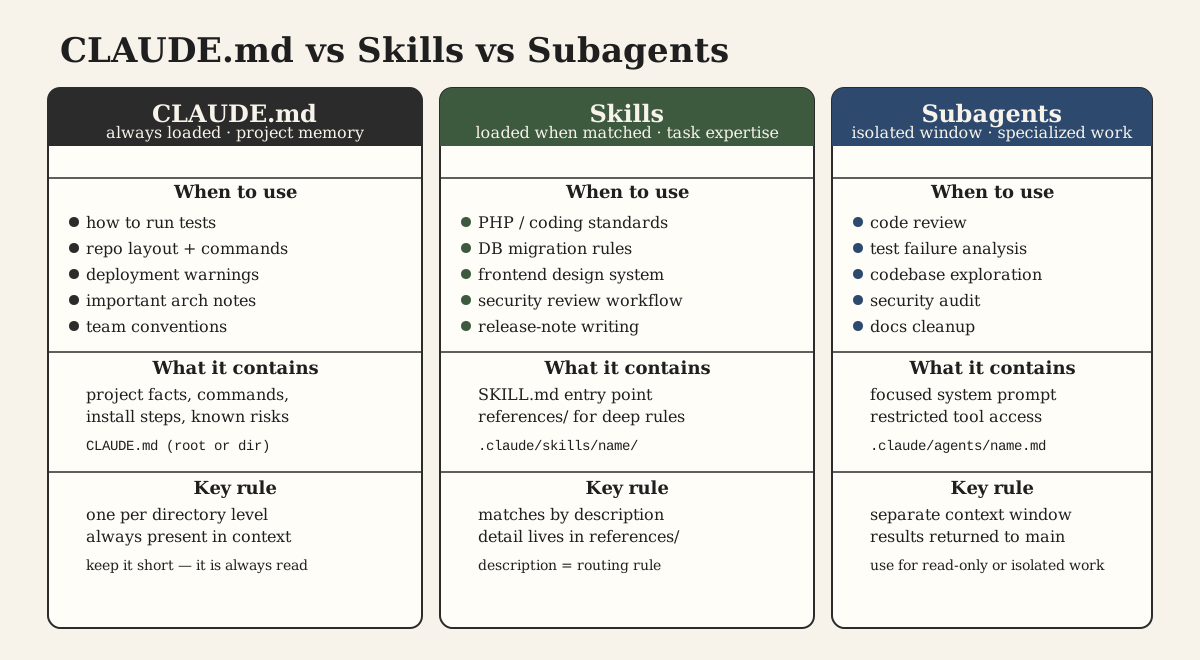
These tools overlap, but they are not the same thing.
Use CLAUDE.md for always-relevant project memory:
- how to install dependencies
- how to run tests
- repository layout
- deployment warnings
- important architectural notes
Use skills for task-specific expertise:
- PHP coding standards
- database migration rules
- frontend design system rules
- release-note writing
- security review workflow
Use subagents for specialized work that benefits from a separate context window or restricted tool access:
- code review
- test failure analysis
- read-only codebase exploration
- security audit
- documentation cleanup
For coding standards, I usually start with a skill, not a subagent. The standards need to influence normal implementation work, not only a separate review pass.
A good setup is:
CLAUDE.md
  General project context and commands

.claude/skills/php-modernization/
  PHP standards and modernization policy

.claude/agents/code-reviewer.md
  Optional focused reviewer that checks diffs against the standards
That gives the main agent enough guidance to write better code and gives the team a stricter review agent when needed.
A Practical Workflow
The workflow I prefer is simple.
First, write the standards as if they were for a human engineer. Avoid vague slogans. Include examples of risky flows, compatibility boundaries, and the expected review output.
Second, move those standards into a project skill. Keep SKILL.md short and put the detailed rules in a reference file.
Third, test the skill on a real change. Do not start with a toy example. Pick a small legacy method with type ambiguity, framework integration, and a clear test command. Watch what Claude does.
Fourth, tighten the instructions based on the mistake pattern. If Claude reformats too much, add a rule about touched lines. If it weakens types to fix errors, add a rule about fixing callers. If it changes framework-facing signatures, add a compatibility warning.
Fifth, make the skill part of the repository. Review it like code. A bad agent instruction can create bad patches at scale, so it deserves the same seriousness as a shared helper class.
Example Prompt After the Skill Exists
Once the skill is in place, the prompt can become much smaller:
Update this order export service for PHP 8.5 compatibility.

Scope:
- app/code/Company/OrderExport/Model/Export.php
- app/code/Company/OrderExport/Model/Mapper.php

Use the project PHP modernization standards.
Preserve framework-facing APIs.
Run the focused unit tests if available.
Return compatibility risks and manual test recommendations.
That prompt works because the standards no longer have to be repeated. They live in the repository.
The agent still needs a clear task, a scope, and a definition of done. Skills do not replace good prompting. They remove repeated context from the prompt so the prompt can focus on the actual change.
What Makes This Work
The value of a coding standards skill is not that Claude becomes obedient.
The value is that the agent starts making the same tradeoffs your team wants reviewers to make:
- modernize code, but preserve production behavior
- add types, but understand legacy data boundaries
- improve structure, but avoid broad rewrites
- use newer language features, but not where they make fragile integration points harder to reason about
- explain risk, not just the diff
That is the standard worth aiming for.
You are not training Claude Code to memorize a style guide. You are giving it the engineering judgment that normally lives in senior developers' heads, code review comments, and old incident history.
Once that judgment is written down as a skill, every future agent session starts from a better place.